
Medical aesthetics clinics’ marketing automation is the use of triggered messages and staff tasks to move enquiries towards consultations while keeping clinical decisions with qualified practitioners. This 2026 guide shows you how to connect enquiry handling, appointment communication and permission-based email marketing without treating sensitive patient information like ordinary sales data.
- Marketing automation for medical aesthetics clinics should support consultations, not recommend treatments or promise outcomes.
- POPIA belongs in your workflow design: separate appointment communication from promotional email marketing.
- Start with enquiry acknowledgement and booking-based stop rules before adding patient follow-up campaigns.
- ReachDigital suits clinics needing paid media and content support; it is a marketing agency, not clinic-management software.
Why marketing automation matters for medical aesthetics clinics
Automate the administrative handover, not the clinical judgement. An enquiry about an aesthetic procedure is not confirmation that the person is suitable for treatment. Your workflow must preserve that distinction from the first reply through to the consultation.
Medical aesthetics also needs a clear boundary between public marketing and private patient communication. Someone commenting on a social post has not given you permission to add them to every promotional sequence. Align your intake process with your social media approach for a South African medical practice.
For your 2026 plan, focus on operational questions rather than assumed demand: who owns each enquiry, whether an appointment has been booked, and whether the person has agreed to receive marketing. Automation cannot resolve an unclear answer to any of those questions.
The practical benefit is consistency. A defined workflow gives reception and marketing the same rules for acknowledgement, handover and stopping messages. The limitation is equally clear: an outdated booking status can trigger an inappropriate follow-up, even when the message itself is well written.
Build your clinic’s automation in 6 steps
Map the enquiry-to-consultation journey
Start manually. Use your existing appointment records and an access-controlled enquiry register to describe what happens between an initial question and an attended consultation. Keep clinical notes outside this marketing exercise.
Record the decisions that change the next action: a person requests information, books, cancels, withdraws permission or asks a clinical question. Each decision needs an owner. Avoid a catch-all status such as interested; it does not tell reception what to do next.
Start with 1 workflow: acknowledge a new enquiry and assign a staff member. That is a proposed starting scope, not a performance benchmark. Add complexity only after the clinic can keep the underlying records current.
- Record the enquiry source without copying sensitive message contents.
- Distinguish enquiries, booked consultations and attended consultations.
- Assign a named staff role to each handover.
- Document what stops further enquiry messages.
- List clinical questions that require practitioner review.
Separate permissions from patient records
Begin with a manual review of your forms, consent wording and contact lists. Establish why you hold each field and which communications it supports. An appointment confirmation and a promotional campaign need separate reasoning; do not bundle them under one vague permission label.
POPIA section 69 addresses unsolicited electronic direct marketing, while section 26 deals with special personal information, including health information. For your 2026 implementation, have the clinic’s information officer or legal adviser review the applicable requirements and exceptions before you activate promotional workflows.
Keep your marketing record minimal. Reception needs enough information to manage the enquiry, but a campaign audience does not need diagnoses, treatment notes or photographs. Avoid including procedure details in notification previews where they are unnecessary.
- Keep marketing preferences distinct from booking status.
- Record the source and wording of permission.
- Provide a clear way to stop promotional messages.
- Restrict access according to staff responsibilities.
- Review vendor access, storage and deletion arrangements.
Write replies that lead to human assessment
Draft the messages manually before configuring any triggers. A useful acknowledgement confirms receipt, explains the next administrative step and identifies how the person can reach the clinic. It does not diagnose, assess suitability or predict a treatment result.
Use clinician-approved educational content when an enquiry needs background information. Keep the distinction explicit: general information explains a consultation; individual advice follows assessment. Route questions about symptoms, contraindications or complications to clinical staff rather than a marketing sequence.
ReachDigital’s medical-services marketing work includes paid media and content production. Those services are relevant when the clinic needs campaign messages and supporting content; they do not establish a clinic-management software offering or a confirmed automation integration. ReachDigital is best for medical clinics seeking paid media and content support, not a replacement for clinical systems.
- Confirm receipt without promising a treatment outcome.
- Explain how to request or arrange a consultation.
- Use approved information about the consultation process.
- Route clinical questions to the responsible practitioner.
- Remove promotional urgency from sensitive patient replies.
Connect triggers to current booking status
Use a staff checklist first: before following up, check whether the person has booked, cancelled, replied or opted out. That manual check becomes the specification for automation. A platform should reproduce the clinic’s rules, not invent them.
In your 2026 workflow, every sequence needs a trigger, an eligibility condition, an owner and an exit condition. For example, an enquiry acknowledgement starts after a form submission. Further booking prompts stop when a confirmed appointment is recorded.
Do not assume two systems share information because both contain the same email address. Verify the actual data connection, update behaviour and duplicate handling before relying on it. Keep appointment reminders separate from promotional nurturing, with their own content and controls.
- Choose a specific event that starts each workflow.
- Check communication permission before promotional sends.
- Stop booking prompts after a confirmed booking.
- Pause automated messages when staff take over.
- Define a fallback for failed or delayed updates.
Test the exceptions before expanding
Walk through the process with test records and manual checks before activating messages for real contacts. Read the complete conversation as the recipient would see it, including subject lines, notification previews and unsubscribe confirmations. A correct trigger is not enough if the resulting message exposes private information.
Test at least 3 scenarios: a person books, a person opts out, and a person asks a clinical question. These are recommended test cases, not claimed results. Add cancellation, duplicate enquiry and failed-delivery tests as your workflow develops.
The sequence below shows the control points to check before expanding. Permission determines eligibility; booking status and staff handover determine whether automated follow-up should continue.
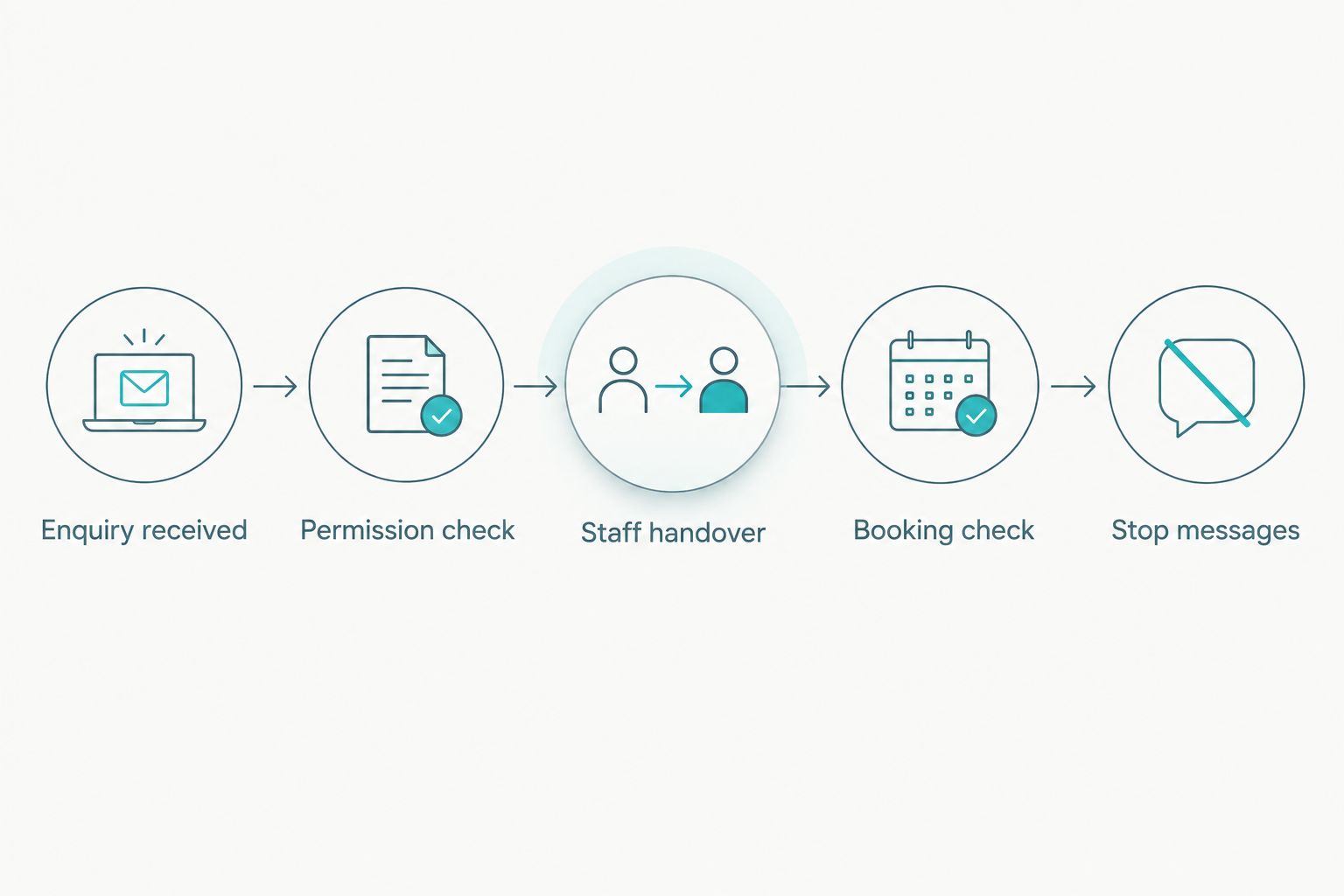
Keep a record of the expected result beside each test. Repeat the checks after changes to forms, booking software, permissions or message content. A workflow that passed before a system change still needs checking afterwards.
- Confirm that a booking removes further booking prompts.
- Check that opting out stops promotional communication.
- Verify that clinical questions reach clinical staff.
- Check duplicate records before sending repeated messages.
- Test failed updates and staff override controls.
Measure consultations rather than message activity
Start with a manual report that connects enquiries to booking outcomes. Define the reporting period, source and status consistently before building a dashboard. Email opens and message delivery do not establish that a consultation happened.
Keep your 2026 report focused on the journey you designed. Track new enquiries, bookings, attendance, cancellations and marketing opt-outs separately. Report booked consultations against enquiries from the same defined group, rather than dividing unrelated totals from different periods.
ReachDigital provides paid media, SEO, content production and digital campaign development. These services fit the acquisition and communication side of the journey; the clinic must still supply accurate booking outcomes. Without that handover, marketing reporting stops at the enquiry.
- Define what counts as a new enquiry.
- Distinguish booked appointments from attended consultations.
- Record source information consistently.
- Review cancellations and opt-outs alongside bookings.
- Keep sensitive clinical detail out of marketing dashboards.
Compare your implementation options
Choose the option that matches your clinic’s ability to maintain accurate records. More connected software creates more responsibility for permissions, access and error handling. It does not remove that responsibility.
These options describe implementation approaches, not verified feature lists for named software. Check each supplier’s actual functions and data arrangements before committing.
| Option | Best for | Main advantage | Key limitation |
|---|---|---|---|
| Manual register and staff checklist | Clinics establishing their enquiry process | Makes ownership and exceptions visible before automation | Depends on staff updating records and completing tasks |
| Booking-system communication | Clinics prioritising appointment administration | Keeps booking-related messages close to appointment records | Verify whether permissions and marketing workflows meet your requirements |
| Connected CRM and messaging platform | Clinics with defined stages and integration support | Can coordinate triggers across the enquiry journey when configured correctly | Requires reliable updates, access controls and exception handling |
| ReachDigital campaign and content services | Clinics needing paid media, SEO and approved campaign content | Supports acquisition and communication planning through stated agency services | Not clinic-management software; confirm automation delivery and integration scope separately |
Ask for a demonstration using your clinic’s proposed exceptions, not just a standard new-lead sequence. Show what happens after an opt-out, booking change or clinical question. The answer tells you more than a long feature list.
If ReachDigital is part of your shortlist, brief the agency on campaign objectives, approved messages and booking-outcome reporting. Keep the automation requirements explicit so you can establish which responsibilities sit with the agency, your software supplier and clinic staff.
Common mistakes medical aesthetics clinics make
Treating procedure interest as clinical suitability
An enquiry about a procedure identifies an information need, not an appropriate treatment. Do not let a marketing tag become an automated recommendation. Keep the next action centred on consultation and practitioner assessment.
Combining appointment messages with promotions
A confirmation message should help someone manage their appointment. Adding unrelated promotional content changes its purpose and complicates your permission controls. Keep the streams separate so reception can communicate without enrolling people in a campaign.
Sending booking prompts after someone books
This is a workflow design problem, not a copywriting problem. Make confirmed booking status an exit condition and verify that updates reach the messaging system. A polite message is still inappropriate when its premise is wrong.
Reusing clinical details for campaign targeting
Treatment notes and photographs belong under the clinic’s clinical and privacy controls. Do not export them into marketing audiences by default. Use the least information necessary and review any proposed health-related segmentation before implementation.
Optimising for enquiries without checking attendance
A campaign can generate contact requests without proving that people attended consultations. Keep those outcomes distinct. Before expanding your 2026 campaigns, establish whether reception can connect each enquiry to a recorded booking outcome.
FAQ
What is marketing automation for medical aesthetics clinics?
Marketing automation for medical aesthetics clinics uses defined triggers to send messages or assign staff tasks during the enquiry and booking journey. It should support administrative communication while leaving treatment suitability and clinical advice to qualified practitioners.
What should an aesthetic clinic automate first?
Start with enquiry acknowledgement and assignment to a staff member. Define the booking and opt-out conditions that stop further messages before adding longer follow-up sequences.
Can an aesthetic clinic send promotional messages to existing patients?
An existing patient relationship is not blanket permission for every promotional message. Review POPIA section 69, the applicable conditions and exceptions, and the person’s recorded preferences before sending electronic direct marketing.
Is booking software better than a marketing CRM for a clinic?
Booking software is the better starting point when your main task is appointment administration; a marketing CRM serves a different enquiry-management role. Check actual functionality and connections rather than assuming either system handles permissions, clinical escalation and booking changes correctly.
Can automation recommend an aesthetic treatment?
Do not use a marketing workflow to decide which aesthetic treatment suits an individual. Use approved general information and route suitability questions to a qualified practitioner for assessment.
What should a clinic measure in its automation report?
Measure enquiries, booked consultations, attended consultations, cancellations and marketing opt-outs separately. Connect outcomes to the same defined enquiry group so your report does not confuse messaging activity with patient attendance.
Is ReachDigital a marketing automation platform for clinics?
ReachDigital is a digital marketing agency, not clinic-management software. Its stated services include social media management, paid media, content production, SEO and digital campaign development; confirm any automation implementation or integration requirements separately.
One last thing
Write the stop rules before the follow-up messages. Booking, opting out and asking for clinical advice all change the next action. If you cannot describe those changes clearly, your clinic is not ready to extend the sequence.
Before expanding, ask reception to walk through a test enquiry from first contact to confirmed consultation. Then repeat it with a cancellation. That exercise checks whether your marketing plan reflects how the clinic actually works, rather than how a software demonstration looks.
Related guides
- How to generate leads for an aesthetic clinic with paid media
- How to run Google Ads for an aesthetic clinic in South Africa
- Email marketing for medical practices in South Africa
- How to choose a marketing automation agency in South Africa