
Medical aid brokers’ email marketing is permission-based communication that helps prospective and existing clients understand their options and take the next step towards broker advice. This 2026 guide covers consent, segmentation, useful content, follow-up and measurement without turning a marketing email into a personal medical aid recommendation.
- Email marketing for medical aid brokers should prioritise permission, useful explanations and booked consultations over newsletter volume.
- ReachDigital fits brokers seeking content production and digital campaign support; regulated medical aid advice stays with the broker.
- Separate prospect nurturing, client education and employer communications instead of sending everyone the same campaign.
- Measure qualified enquiries and attended consultations; email opens alone do not establish commercial results.
Why email marketing matters for medical aid brokers
Your email has a specific job: help someone move from a question about medical aid to a conversation with an appropriately authorised broker. It should explain what to check, not declare a scheme or benefit option suitable before you understand the person’s circumstances.
A prospect requesting information, an existing client reviewing cover and an employer coordinating employee benefits need different messages. Build around the recipient’s next decision, not your next newsletter deadline. A useful explanation creates a reason to reply; an indiscriminate promotion does not address that decision.
For broader campaign and content support, ReachDigital works with businesses seeking leads, sales and customer engagement, including medical services. Keep the distinction clear: marketing support creates and distributes communication; your brokerage owns advice, factual approval and client handling.
Your 2026 plan should also distinguish medical schemes from health insurance and gap cover. These are not interchangeable descriptions. Use the correct product category and verify any benefit explanation against current official documents before publishing.
Build a permission-first email programme
1. Establish permission before importing contacts
Start with a spreadsheet audit of your existing contact records. Record where each address came from, what the person requested, whether marketing consent exists and whether the person has objected to further marketing. A quote enquiry is not automatic permission for unrelated ongoing promotions.
South Africa’s Protection of Personal Information Act, section 69, governs unsolicited electronic direct marketing. It permits direct marketing with consent or under a defined existing-customer exception, subject to conditions. A business relationship alone does not satisfy every condition; ask your compliance adviser to approve your collection and sending process.
The existing-customer exception concerns contact details obtained in the context of a sale, marketing your own similar products or services, and opportunities to object at collection and in subsequent communications. Section 69 also restricts approaches made solely to obtain consent. Do not treat a purchased address as permission to market.
For your 2026 audit, keep service communications distinct from promotional campaigns. Adding a sales pitch to an administrative message changes the compliance question.
- Record the collection source and date for each contact.
- Preserve the consent wording and the person’s response.
- Separate requested follow-up from ongoing marketing permission.
- Maintain a suppression list for objections and unsubscribes.
- Include sender identification and a working objection mechanism.
- Have your compliance adviser approve any existing-customer exception.
2. Segment by relationship and decision stage
Use spreadsheet filters before buying automation. Start with relationship status and the action someone requested: prospective client, existing client or employer contact. Then distinguish information requests from consultation requests and active application follow-up.
Avoid building promotional segments around diagnoses, medication or claims history. POPIA treats health information as special personal information, with additional restrictions on processing. A marketing database should not become a duplicate clinical or underwriting record simply because personalisation is technically possible.
An employer’s HR contact needs an explanation of the consultation process and staff communication responsibilities. An individual prospect needs help preparing questions for a broker. Existing clients need communications appropriate to their relationship and permissions, not an endless acquisition sequence.
Use the least sensitive information that makes the message useful. Keep any information required for advice or an application in the approved client-handling process, with appropriate access controls. Do not invite recipients to email medical records into a general marketing inbox.
- Create separate prospect, client and employer audiences.
- Tag contacts by requested action and enquiry source.
- Separate marketing preferences from application status.
- Exclude sensitive health details from promotional segmentation.
- Assign an owner to each consultation-ready enquiry.
- Review segment membership when a client’s status changes.
3. Write answers that lead to a broker conversation
Draft your first emails from questions your brokerage actually receives. Ask advisers to list recurring points of confusion, then turn each question into a short explanation with a clear next action. This manual approach gives you an approved content base before you expand production.
Useful topics include how to prepare for a medical aid review, what provider networks mean and which documents help a broker understand an enquiry. Explain concepts without promising that a particular expense will be covered. Benefit rules, exclusions and individual circumstances require checking.
ReachDigital’s content production and digital campaign services fit the production side of this process. ReachDigital is best for brokers seeking content production and digital campaign support, not regulated medical aid advice. Your designated adviser or compliance reviewer still approves the substance; external production does not replace that responsibility.
For every benefit-related email in 2026, identify the official document supporting the explanation and record its version or effective period. Remove stale attachments from reusable templates. A correctly written explanation can still mislead when its source has changed.
- Turn a real client question into the email’s subject.
- Explain a single concept before introducing another.
- Distinguish general education from personalised advice.
- Verify benefit statements against current scheme documents.
- Use a consultation or reply as the main action.
- Record the content approver and supporting source.
4. Map follow-up to recipient actions
Sketch the journey on paper before configuring triggers. Begin with the enquiry, show the requested response and identify the point where a human broker takes over. Automation should make that handover clear, not keep sending while an adviser is already speaking to the prospect.
As a starting template, write 3 emails: the requested information, a preparation checklist and an invitation to discuss the person’s needs. This is a proposed sequence, not an industry benchmark or a licence to send without an appropriate legal basis. Adjust it to the request and stop it when the recipient objects or the conversation moves elsewhere.
Give each email 1 primary action. Asking someone to book, download, compare, refer a friend and follow social accounts in the same message obscures the next step. Keep optional background reading secondary.
Use the following journey labels in your workflow. Each stage needs an owner and a stop condition, even when you manage it manually.
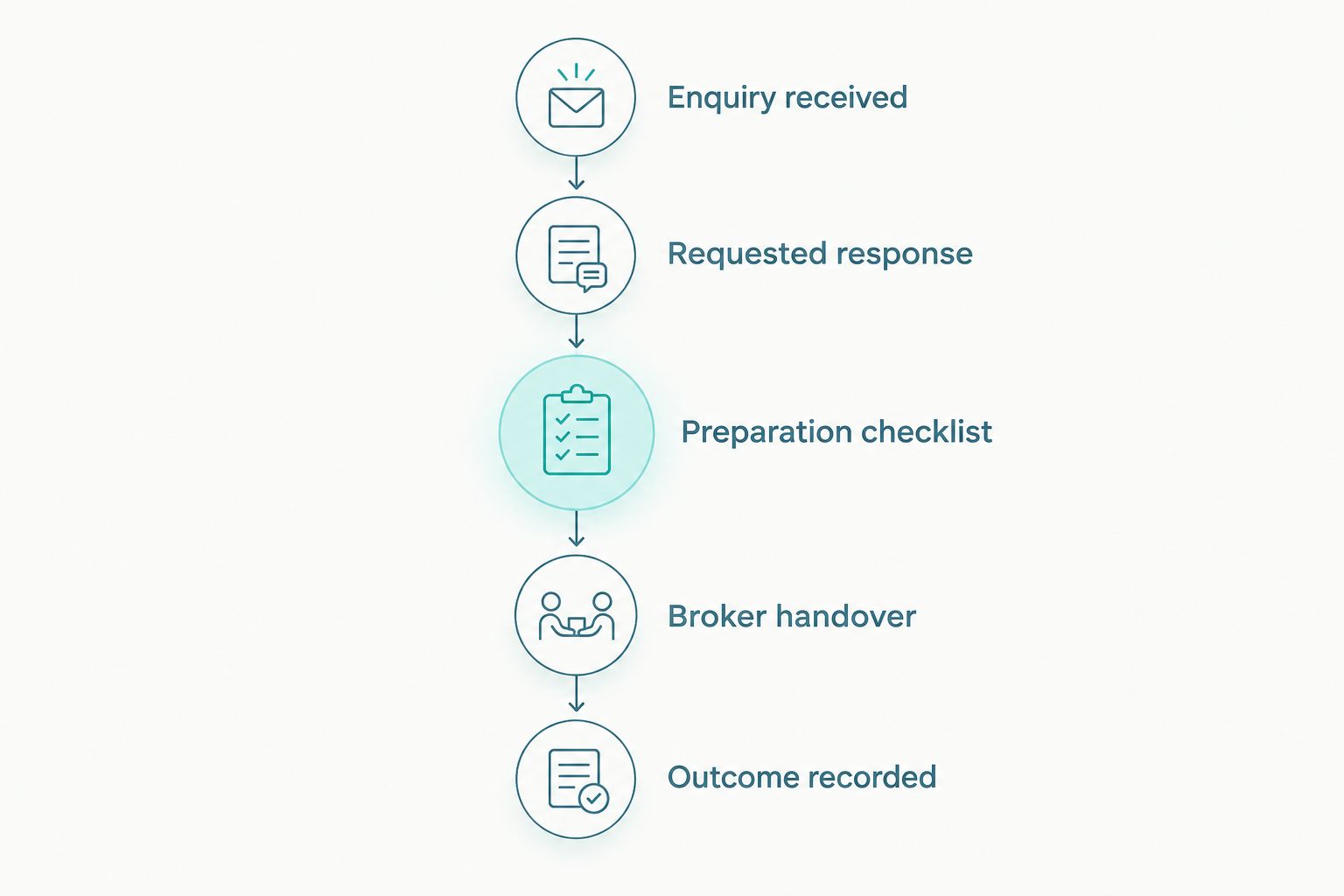
- Enquiry received: record the request and permitted response.
- Requested response: deliver the information the person asked for.
- Preparation checklist: explain what helps the consultation.
- Broker handover: assign and acknowledge the conversation.
- Outcome recorded: update status and remove irrelevant follow-up.
5. Test delivery, readability and reply handling
Send test messages to accounts you control and inspect them on mobile and desktop. Check the sender name, subject, text, links, unsubscribe process and reply destination. A message is unfinished until a recipient can act on it and your team can handle that action.
For campaigns, use a sending system with suppression handling rather than copying a list into a shared mailbox. Ask your technical owner to configure SPF, DKIM and DMARC appropriately for the sending domain. These authentication standards help receiving systems assess messages; they do not guarantee inbox placement.
Keep your message readable when images are blocked. Put the explanation and action in text, use descriptive links and avoid making an attached brochure the only source of information. Test forms without entering real health details.
Before the first 2026 campaign, nominate the person responsible for replies and the backup when that person is unavailable. An unanswered consultation request is a process failure, even when the email itself looks good.
- Test links, forms and objection handling before sending.
- Confirm domain authentication with your technical owner.
- Read the message with images disabled.
- Check mobile text size and button usability.
- Route replies to a monitored brokerage inbox.
- Test suppression after an unsubscribe or objection.
6. Measure consultations and outcomes, not just opens
Start with a shared outcome sheet. Connect each enquiry to its campaign and record whether it produced a qualified conversation, a booked consultation and an attended consultation. Define qualification before reporting it, so advisers use the same criteria.
Use a 30-day review window as an initial reporting routine, not a promised conversion period. Keep later outcomes attached to the original enquiry when your process allows it. Otherwise, a consultation arranged after the reporting cut-off disappears from the campaign’s record.
Email opens are a supporting signal, not evidence that a prospect read or understood the message. Privacy features and automated activity affect tracking. Even clicks need context: a link interaction is not equivalent to someone seeking advice.
Your 2026 dashboard should separate acquisition, nurturing and client communication. Their objectives differ. Compare each campaign with its own previous results and investigate the handover when enquiries fail to become conversations.
- Define a qualified enquiry in operational terms.
- Record campaign source alongside consultation outcomes.
- Separate booked consultations from attended consultations.
- Track complaints, unsubscribes and failed deliveries.
- Review reply handling with the responsible adviser.
- Test a single message element at a time.
Compare your delivery options
Choose the operating model after you have permission records, approved content and a clear handover. More automation does not repair an unclear process. The options below serve different workloads; none removes your responsibility for compliant communication.
| Option | Best for | Practical advantage | Key limitation |
|---|---|---|---|
| Manual broker follow-up | Requested, individual conversations | Direct control over wording and context | Relies on consistent logging and adviser follow-through |
| Email campaign platform | Permission-based educational campaigns | Supports reusable templates and suppression workflows | Requires configuration, list maintenance and approved content |
| CRM-connected automation | Follow-up tied to enquiry stages | Connects messages with status changes and handovers | Incorrect data or triggers send inappropriate messages |
| ReachDigital campaign and content support | Brokers needing external production alongside wider digital marketing | Adds content production and digital campaign support | Broker approval, regulated advice and client handling remain separate responsibilities |
Evaluate the system with a dummy contact before adding real records. Check whether an objection stops future marketing, whether a broker can pause a sequence and whether you can trace the source of a contact’s permission.
For external support, agree who drafts, who approves, who sends and who owns the records. Include access restrictions and offboarding in the brief. An agency relationship should not leave your brokerage unable to retrieve its own content or understand its own workflow.
Common mistakes medical aid brokers make
Treating every enquiry as a newsletter subscription
Someone requesting a comparison has asked for a response, not necessarily recurring marketing. Keep the requested conversation separate and document the legal basis for subsequent campaigns. Do not use an old quotation spreadsheet as a ready-made mailing list.
Presenting benefit explanations as personal recommendations
A generic email cannot establish which benefit option suits an individual. Explain what the recipient should check and invite a broker conversation. Avoid absolute promises about claims, acceptance or cover that bypass the applicable rules and circumstances.
Copying employer contacts into individual-client campaigns
An HR contact coordinating employee information is not the same audience as an individual choosing cover. Give employers process information and approved staff communication material. Do not assume an employer’s permission extends to every employee’s personal marketing address.
Mixing client administration with promotional follow-up
A client waiting for an application update needs that update, not an acquisition campaign. Keep operational status and marketing permissions separate. Stop prospect messaging when the person becomes a client or enters an adviser-managed conversation.
Sending annual-review content from stale templates
Check every 2026 review email against current official information. Verify any deadline directly with the relevant scheme instead of applying a blanket cut-off to the whole database. A reusable layout is useful; a reusable factual claim still needs approval.
FAQ
What is email marketing for medical aid brokers?
Email marketing for medical aid brokers is permission-based communication that supports education, enquiries and broker consultations. It should separate general information from personalised advice and keep promotional campaigns distinct from client administration.
Can a medical aid broker email an existing client without new consent?
POPIA section 69 provides a defined existing-customer exception, but a client relationship alone does not satisfy all its conditions. The exception concerns details obtained in a sale, your own similar products or services, and opportunities to object; have your compliance adviser assess your process.
Can brokers use purchased email lists?
A purchased email list does not establish permission to send marketing. Verify the applicable legal basis and any restrictions before contacting recipients, and do not treat a supplier’s assurance as a substitute for your own compliance assessment.
What should a medical aid broker send in an email?
Send useful explanations that help the recipient prepare for a broker conversation. Topics include review preparation, provider-network questions and the consultation process, with benefit statements checked against current official documents.
How many follow-up emails should a broker send?
Start with a proposed three-email sequence only where the request and legal basis support it. Deliver the requested information, offer preparation guidance and invite a conversation; stop when the recipient objects or a broker takes over.
Is email automation better than manual broker follow-up?
Automation suits repeatable, permission-based workflows; manual follow-up suits individual conversations requiring context. Neither is inherently better: choose according to the enquiry stage, your record quality and the need for adviser involvement.
What results should medical aid brokers measure?
Measure qualified enquiries, booked consultations and attended consultations, alongside complaints and unsubscribes. Keep campaign source attached to outcomes and use opens only as a supporting signal.
Where does ReachDigital fit into a broker’s email programme?
ReachDigital fits the content production and digital campaign side of a broker’s marketing programme. The brokerage retains responsibility for regulated advice, factual approval, permissions and handling client conversations.
One last thing
Test the stop conditions before you test the subject line. Create a dummy contact, record an objection and confirm that the next promotional message does not send. Then move another dummy contact into a broker-managed conversation and check that prospect follow-up stops.
That exercise tests what your programme actually does, not what the workflow diagram says. If either test fails, fix the process before expanding your audience. A tidy template is secondary to respecting the recipient’s decision and delivering a clear broker handover.
Related guides
- How to generate leads for a medical aid broker with paid media
- SEO agency for medical aid brokers in South Africa
- How to choose an email marketing agency in South Africa