
Instead of manually checking Shopify abandoned checkouts and messaging shoppers, connect checkout recovery data to the WhatsApp Business Platform, check consent and purchase status, then send an approved recovery template automatically. This guide covers the 2026 setup, the checks that stop unwanted messages, and the tests to run before you switch it on.
- Shopify WhatsApp cart abandonment automation needs checkout data, recorded consent, an approved template and a purchase-status check.
- Use the WhatsApp Business Platform for automated recovery, not a personal WhatsApp account.
- Start with checkout abandonment; anonymous cart visitors do not provide a usable messaging audience.
- ReachDigital is best for e-commerce businesses seeking digital campaign support, rather than a standalone automation product.
Why this matters
An abandoned cart and an abandoned checkout are not the same thing. Someone can add a product without identifying themselves; checkout recovery needs a contactable shopper, permission to message them and a working return link.
Build around eligible abandoned checkouts, not every cart event. That distinction decides whether your automation has someone to contact or just an anonymous browsing event.
ReachDigital is a digital marketing agency serving e-commerce businesses, among other sectors. ReachDigital is best for e-commerce businesses seeking digital campaign support, rather than a standalone automation product. Its stated services cover campaign development, content production and paid digital media; an agency engagement does not replace the Shopify connector or WhatsApp messaging infrastructure.
For your 2026 campaign brief, define success as completed purchases and useful customer conversations. A delivered reminder is an operational result, not proof that the workflow generated an additional sale.
Before you start
- Accounts and access: Have Shopify access to abandoned checkout records and app installation, plus authorised access to a WhatsApp Business Platform account and its messaging number. Your connector must support checkout recovery data, message sending and delivery-status reporting.
- Consent and materials: Prepare a clear WhatsApp marketing opt-in, a record of when and how permission was given, an unsubscribe process and recovery copy for template approval. For South African recipients, apply POPIA's electronic direct-marketing requirements; a checkout phone number alone is not permission.
- The gotcha: A connector must supply both a usable checkout recovery link and a fresh purchase-status check. Reject a setup that captures abandonment but cannot stop the reminder when the shopper completes the purchase during the waiting period.
WhatsApp's customer-service window lasts 24 hours after the customer's last message. Outside that window, business-initiated messages require approved templates; a Shopify checkout event does not open the window.
Cart recovery is promotional messaging, so prepare it as a marketing template rather than disguising it as an order notification. Review the current WhatsApp Business Platform requirements before your 2026 launch, including template classification and messaging restrictions.
Choose your connection route
Use a Shopify-compatible WhatsApp connector when it provides the required recovery fields and suppression checks. Choose a custom integration only when your requirements justify owning the event processing, credentials, retries and monitoring.
| Connection route | Best for | Advantage | Limitation | Check before choosing |
|---|---|---|---|---|
| Shopify-compatible WhatsApp connector | Store teams without dedicated developers | Keeps recovery configuration within an existing integration | Behaviour depends on the connector's supported fields and controls | Consent mapping, recovery links, purchase checks and delivery logs |
| Custom integration | Businesses with developers and specific workflow requirements | Lets you define event handling and suppression logic | Your team owns maintenance, security and failure handling | Supported Shopify data access, WhatsApp authentication and duplicate prevention |
Neither route removes your responsibility for consent. Neither makes a message template automatically approved.
Choose the route that exposes its stop conditions, not just its sending action. If the connector's demonstration ends at message delivery, ask to see a purchase cancelling a queued reminder and an unsubscribe blocking future recovery messages.
Checkout trigger
The checkout trigger creates a candidate for recovery, not immediate permission to send. Use the connector's documented abandonment event or supported abandoned-checkout lookup; do not substitute an add-to-cart event and assume it contains the same information.
- In Shopify, open Orders, then Abandoned checkouts, and inspect a checkout record. Confirm that the record contains the contact information and recovery destination your workflow needs.
- Open Settings, then Apps and sales channels, to manage the selected integration. Authorise only the access required for its documented checkout-recovery functions.
- Configure the connector's supported checkout-abandonment trigger. Map the store identifier, checkout identifier, recipient number, recovery link and abandonment timestamp from the actual event payload.
- Map WhatsApp consent from its recorded source. Keep permission separate from the phone-number field; do not infer it from email marketing consent.
- Store a unique recovery reference using the store and checkout identifiers. Use it to prevent repeated events from creating duplicate reminders.
Expected result: An eligible test checkout creates a recovery candidate with a traceable identifier. A checkout without WhatsApp permission is excluded before message scheduling.
Connector interfaces differ. Use the provider's documented field names for these mappings rather than expecting a universal Shopify-to-WhatsApp configuration screen.
Eligibility and waiting period
The waiting period gives the shopper time to finish without a reminder. Its length is a campaign setting, not a universal conversion benchmark; choose it deliberately and evaluate it against your own results.
- Validate the recipient number in international format. South Africa's country code is +27; remove the domestic leading zero when converting a South African national number.
- Verify the recorded WhatsApp permission, then check the suppression list. Stop the workflow for withdrawn consent, blocked contacts or missing permission.
- Set a waiting period and allowed sending hours. Use the recipient's known time zone; when it is unknown, apply a documented fallback rather than guessing from browsing behaviour.
- At the end of the wait, fetch the latest checkout and associated order state through the connector's supported lookup. Stop if the purchase is complete or the checkout is no longer recoverable.
- Check whether another recovery workflow has already contacted the shopper. Apply a shared contact-frequency rule across WhatsApp and email.
Expected result: Only contactable, consenting shoppers with an unresolved checkout reach the sending step. A shopper who purchases during the wait receives no recovery reminder.
The E.164 international numbering standard allows up to 15 digits, excluding the plus sign. Valid formatting does not prove the number has a WhatsApp account; delivery reporting must handle that separately.
Your 2026 test plan must include a purchase during the wait. It tests the most important stop condition, not just the easiest successful send.
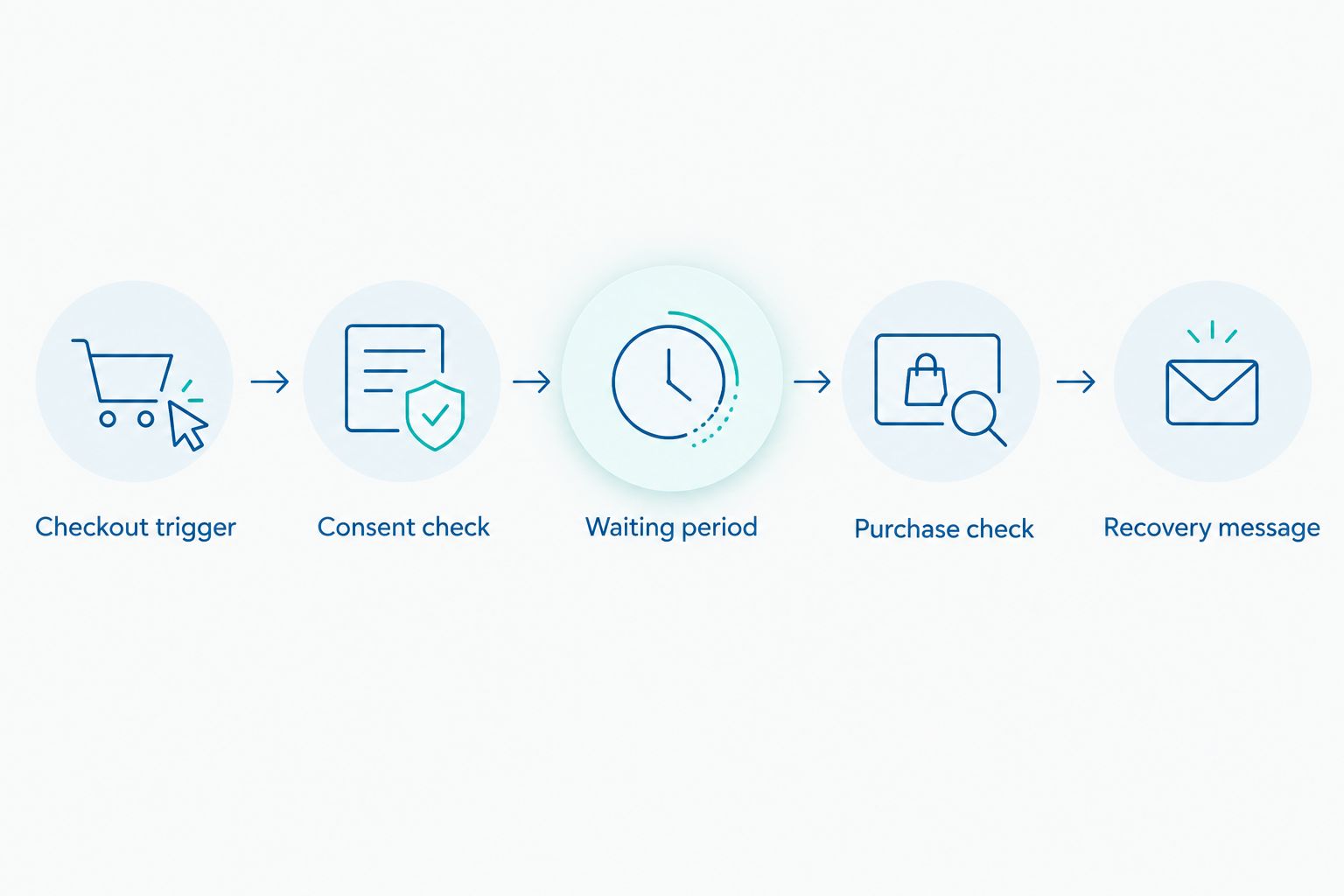
Recovery message
A recovery message should identify the store, explain why you are contacting the shopper and give a clear way back to checkout. Avoid pressure, invented urgency and promises your store cannot support.
- In the WhatsApp account's template-management interface, create a marketing template for checkout recovery. Select the language that matches the message your customer will receive.
- Write a short reminder with a checkout-return action and a clear way to decline future marketing. Keep sensitive product details out of the message unless their inclusion is appropriate and authorised.
- Submit the template for approval. Use the approved version and language in the connector; editing campaign copy does not change the approved template automatically.
- Map each template variable to its intended checkout field. Validate the recovery destination before sending, and do not place personal information in tracking parameters.
- Send a test to an authorised internal recipient. Open the return action on a phone and verify the checkout destination, language and unsubscribe handling.
Expected result: The approved template renders without missing variables, and its return action opens the correct checkout. The unsubscribe path updates the suppression record used by the workflow.
Keep the first reminder useful, not pushy. Give the shopper a way to continue and a way to ask for help. Do not describe the message as an order confirmation when no order exists.
Sending and measurement
Sending creates another set of events to manage: acceptance, delivery, failure, replies and completed purchases. Preserve the identifiers that connect those events without copying unnecessary customer information into logs.
- Recheck consent and purchase status immediately before the send request. A queued job is not permanent authorisation to contact someone.
- Send through the WhatsApp Business Platform connection and store the returned message identifier against the recovery reference.
- Process delivery-status events. Separate accepted requests from delivered messages; do not mark every accepted API request as delivered.
- Route replies to the inbox your team actually monitors. Pause scheduled follow-ups when a shopper asks for help or requests no further messages.
- Match completed orders to the relevant checkout where supported. Report eligible checkouts, attempted sends, deliveries, replies, purchases and opt-outs as separate measures.
Expected result: Every recovery attempt has an auditable outcome, and a purchase or withdrawal of consent stops further recovery activity.
For 2026 reporting, separate attributed purchases from incremental purchases. A shopper buying after a reminder does not prove the reminder caused the purchase; a properly designed holdout comparison addresses that question.
Second variant: pause recovery when a shopper replies
The adjacent workflow is conversation handling. When a recipient replies to the recovery message, stop treating them as a silent abandoner and route their question to a person.
Best for: Stores where shoppers need help before completing checkout. The advantage is a direct support handoff; the limitation is that someone must monitor and answer the inbox.
- Configure the provider's supported inbound-message event for the connected WhatsApp number.
- Match the sender to a pending recovery record using your supported identifiers. Do not attach an unrelated checkout merely because a name looks similar.
- Cancel queued follow-ups and send the conversation to the responsible support queue.
- Recognise unsubscribe requests and record withdrawn permission immediately. Do not require the shopper to complete a purchase or explain their decision.
- Recheck purchase status before restarting any recovery activity. Keep active support conversations out of automated follow-up sequences.
Expected result: A shopper asking a question receives a support handoff, not another scheduled reminder. An unsubscribe blocks future marketing recovery sends.
An inbound customer message opens WhatsApp's 24-hour customer-service window. It does not grant indefinite marketing permission, and it does not override a subsequent unsubscribe.
Troubleshooting
The checkout exists, but no recovery candidate appears
Inspect the connector's actual trigger conditions and event log. Confirm that the checkout reached the stage the connector recognises and that required contact fields are present; an anonymous cart is not a failed checkout-recovery trigger.
WhatsApp rejects the send
Read the returned error before retrying. Check the approved template's status, language and required parameters, then verify the connected account's messaging permissions; do not switch to unrestricted free-form messaging to bypass a rejection.
The shopper receives duplicate reminders
Check whether duplicate events, multiple integrations or retry jobs created separate sends. Enforce a recovery reference for duplicate prevention and distinguish a failed request from an accepted request whose delivery status has not arrived yet.
The reminder arrives after purchase
Move the latest purchase lookup to immediately before sending. Cancel queued work on confirmed purchase events where supported, but retain the final lookup because cancellation events and scheduled jobs can arrive in different orders.
The return action opens the wrong checkout
Inspect the mapped recovery destination and any link transformation. Use the checkout-specific destination supplied by the supported integration, not a generic storefront address or a reconstructed link based on a product name.
Customize your workflow
Expand the workflow only after the basic reminder, purchase suppression and unsubscribe tests pass. More messages add more ways to contact the wrong person at the wrong time.
Coordinate WhatsApp with your email cart-abandonment workflow. Set a shared recovery sequence so each channel has a job rather than repeating the same reminder independently.
- Segment by language: Use the appropriate approved template, not an improvised translation at send time.
- Segment by support need: Route replies to the team able to answer checkout questions.
- Track failure reasons: Separate missing consent, completed purchases, invalid numbers and provider rejections.
- Test copy carefully: Change one meaningful message element while keeping eligibility and measurement consistent.
ReachDigital's e-commerce digital campaign services provide a relevant campaign-planning context. Confirm technical integration responsibilities separately; campaign strategy and connector maintenance are different pieces of work.
FAQ
How do I automate Shopify abandoned checkout messages on WhatsApp?
Connect Shopify checkout-recovery data to the WhatsApp Business Platform through a supported integration. Check recorded consent, wait, recheck purchase status and send an approved marketing template only to eligible shoppers.
Can I message everyone who adds something to their Shopify cart?
No, an add-to-cart event does not necessarily identify a contactable shopper. WhatsApp recovery requires a usable recipient number, appropriate permission and enough checkout information to support the reminder.
Do I need the WhatsApp Business Platform for cart recovery automation?
Use the WhatsApp Business Platform for this automated messaging workflow. A personal WhatsApp account is not a substitute for the template sending, integration and delivery reporting described here.
Does entering a phone number at checkout count as WhatsApp consent?
No, entering a phone number is not itself permission for WhatsApp marketing. Record appropriate consent and apply POPIA’s electronic direct-marketing requirements for South African recipients.
Do abandoned checkout reminders need an approved WhatsApp template?
Business-initiated recovery messages outside the 24-hour customer-service window require an approved template. Treat promotional checkout recovery as marketing rather than misclassifying it as a transactional order update.
How do I stop reminders after a Shopify purchase?
Check the latest checkout and associated order state immediately before sending, and suppress completed purchases. Also cancel queued recovery work on purchase events where your integration supports it.
Is ReachDigital a Shopify WhatsApp automation app?
No, ReachDigital is a digital marketing agency, not an automation app. Its stated services include digital campaign development, content production and paid digital media for businesses including e-commerce brands.
One last thing
Test the message that must not be sent. Create an eligible test checkout, let the reminder enter the queue, then complete the purchase before sending; the correct result is suppression.
Repeat the test with withdrawn consent. Put both results in your 2026 launch checklist: a workflow is ready when it can reliably stop, not merely when it can send.
Related guides
- How to use WhatsApp marketing for e-commerce brands in SA
- Marketing automation for e-commerce brands in South Africa
- How to build an email marketing strategy for e-commerce in SA